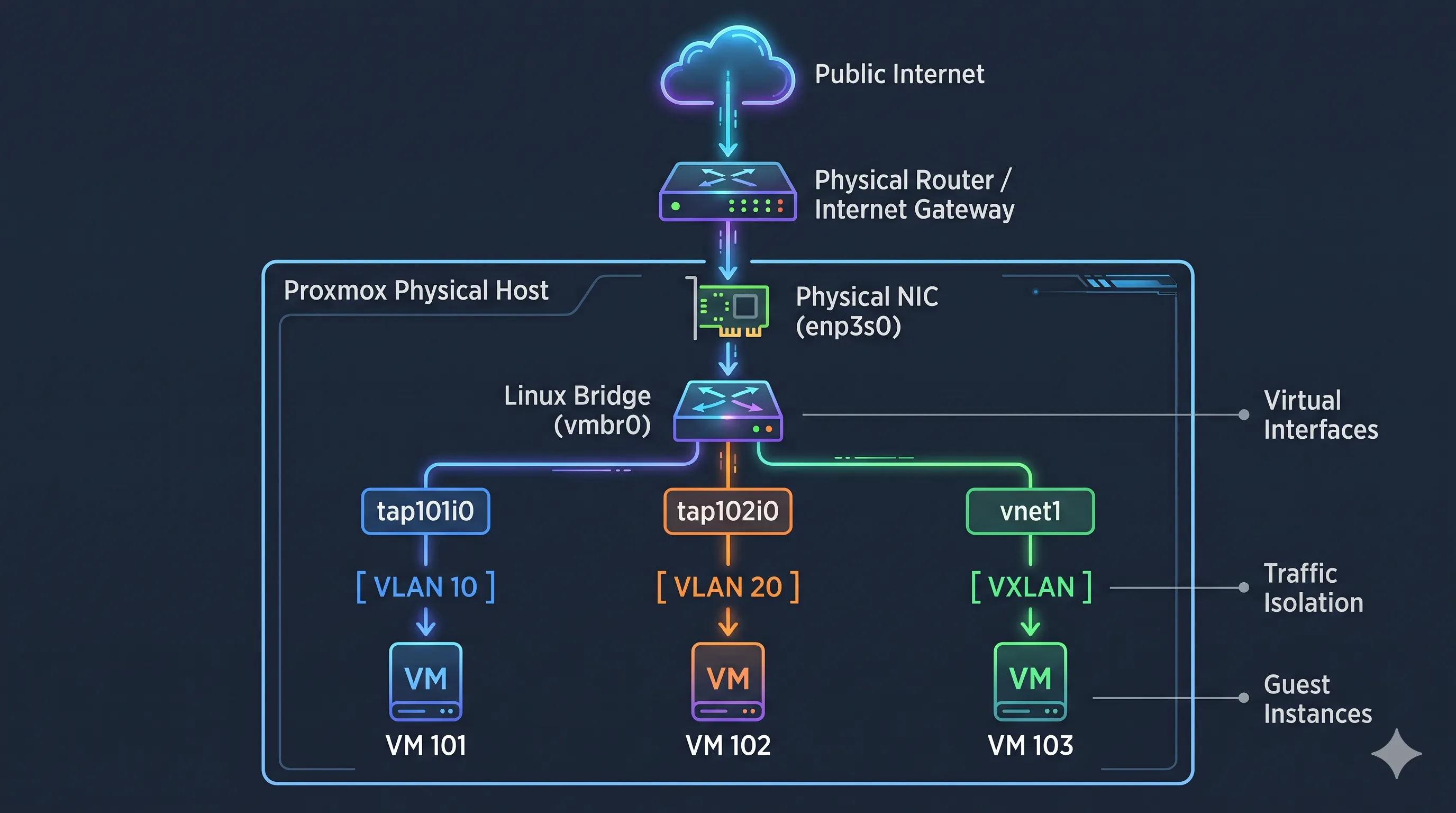
In Proxmox VE, networking is all about connecting virtual machines (VMs) and Linux Containers (LXCs) to each other and to the outside world. Because Proxmox sits directly on the physical server, it uses standard Linux networking concepts abstracted into a web interface.
We will look at seven core networking components operate specifically within the context of a Proxmox node.
               [ Public Internet ]
                       │
               [ Physical Router / Internet Gateway ]
                       │
         ┌─────────────▼────────────────────────────────┐
         │ Proxmox Physical Host                        │
         │   Physical NIC (enp3s0)                      │
         │         │                                    │
         │   ┌─────▼──────────────────────────────┐     │
         │   │ Linux Bridge (vmbr0)               │     │
         │   └─────┬──────────────┬──────────────┬┘     │
         │         │              │              │      │
         │   ┌─────▼─────┐  ┌─────▼─────┐  ┌─────▼──┐   │
         │   │ tap101i0  │  │ tap102i0  │  │ vnet1  │   │ (Virtual Interfaces)
         │   └─────┬─────┘  └─────┬─────┘  └─────┬──┘   │
         │         │              │              │      │
         │     [ VLAN 10 ]    [ VLAN 20 ]    [ VXLAN ]  │ (Traffic Isolation)
         │         │              │              │      │
         │     ┌───▼───┐       ┌──▼────┐       ┌─▼────┐ │
         │     │ VM 101│       │ VM 102│       │VM 103│ │ (Guest Instances)
         │     └───────┘       └───────┘       └──────┘ │
         └──────────────────────────────────────────────┘
Bridge Interface (vmbr)
A Bridge Interface (typically named vmbr0, vmbr1, etc.) acts as a virtual network switch running inside your Proxmox host.
- How Proxmox uses it: When you create a VM or LXC, you attach its virtual network card (NIC) to a Proxmox bridge.
- The Physical Connection: To let your VMs talk to the physical world, you attach a physical network port (like eth0 or enp3s0) to the bridge.
- Analogy: Think of the bridge as a physical network switch sitting on top of your server. Every VM plugs a virtual cable into this switch, and one physical cable links the switch to your physical home or office wall jack.
VLAN (Virtual Local Area Network)
A VLAN splits a single physical bridge or switch into multiple, isolated logical networks using numerical tags (VLAN IDs from 1 to 4094).
- How Proxmox uses it: Proxmox bridges can be made VLAN-aware. Once enabled, you don’t need to configure complex settings on the host. You simply type a “VLAN Tag” (e.g., 10 for Corporate, 20 for IoT) directly into the hardware settings of a specific VM’s network card. Proxmox will automatically tag and isolate that VM’s traffic.
- Analogy: Color-coding letters. Everyone drops their mail into the same mailbox (the bridge), but letters with a red sticker (VLAN 10) can only be read by people in the red room, and blue stickers (VLAN 20) by the blue room.
VXLAN (Virtual Extensible LAN)
A VXLAN is an advanced overlay protocol that encapsulates layer 2 ethernet frames inside layer 4 UDP packets. It allows you to stretch a virtual network across completely different physical networks or distinct Proxmox hosts.
- How Proxmox uses it: Managed via Proxmox’s built-in SDN (Software-Defined Networking) zone controller. If you have a cluster of Proxmox nodes spread across different rooms or data centres that cannot share standard VLANs, VXLAN tunnels the VM traffic over the existing Layer 3 routed network. It also breaks the 4,094 VLAN limit, allowing up to 16 million unique networks.
- Analogy: Mailing a letter inside a larger package. The physical routers only look at the outside address to ship it across the country, but once it arrives at the destination Proxmox host, the package is opened, revealing the original local VM network frame inside.
Router
A Router directs traffic between different IP networks or subnets (e.g., sending data from your 192.168.10.x VLAN to your 192.168.20.x VLAN).
- How Proxmox uses it: Proxmox itself is generally configured as a Layer 2 switching host, but it can act as a router if you enable IP forwarding in Linux. However, the most common practice in Proxmox is to deploy a virtualised router (like a pfSense, OPNsense, or VyOS VM). You connect this router VM to multiple Proxmox bridges/VLANs, and it handles the traffic routing between them.
- Analogy: An intersection traffic controller. If a VM on the “Web Server” network needs to talk to a VM on the “Database” network, the router inspects the destination IP and steers the traffic to the correct virtual network.
Internet Gateway
An Internet Gateway (or Default Gateway) is a specific type of router configuration that acts as the exit point for any traffic leaving the local network destined for the public internet.
- How Proxmox uses it:
- For the Host: Proxmox needs its own internet gateway IP (usually your physical router’s IP) in its network configurations so the host can download Debian updates, Proxmox patches, and templates.
- For the Guests: Your VMs need an internet gateway assigned to their virtual network cards (often the IP of your virtual firewall/router VM) so they can access the web.
- Analogy: The front door of an office building. If an employee (VM) wants to talk to a coworker in the next cubicle, they stay inside. If they want to go get lunch in the city (the internet), they must go through the front door (Gateway).
Virtual Interface (vnet / tap / fwbr)
A Virtual Interface is the software-defined endpoint created dynamically by Proxmox to link individual VMs to the host’s networking architecture.
- How Proxmox uses it: When a VM boots, Proxmox creates a temporary interface on the host (often named tap100i0 for VM 100, or veth100i0 for LXC 100). If you turn on the Proxmox Firewall for that VM, Proxmox automatically spawns an internal firewall bridge interface (fwbr100i0) to filter traffic before it even reaches the main virtual switch (vmbr0).
- Analogy: The actual virtual network jack on the side of your VM. It is the invisible digital cable plugged directly into the Proxmox bridge.
Subnet
A subnet is a logical subdivision of an IP network (written in CIDR notation like 192.168.10.0/24) that defines which IP addresses belong together in the same local broadcast domain. While VLANs and bridges act as the physical or virtual “wires” and “switches,” subnets are the Layer 3 IP addressing rules that let your Proxmox hosts, VMs, and containers communicate and route traffic properly.
Where Subnets Are Defined in Proxmox
You encounter and configure subnets in three main places inside a Proxmox deployment:
- The Proxmox Host Management IP: During installation, you assign your physical node a static IP and subnet mask (e.g., 192.168.1.50/24). This determines which local network can access the Proxmox web interface (port 8006) and SSH.
- Guest VMs and LXCs: Inside each virtual machine or container, you assign an IP address and subnet mask (either manually or via DHCP). Two VMs on the same bridge can only talk directly to each other without a router if they share the same subnet.
- Proxmox SDN (Software-Defined Networking): Under Datacenter > SDN > VNets, Proxmox lets you formally define Subnets directly in the web UI. Here, you specify the CIDR range (e.g., 10.10.10.0/24), a default gateway IP, and optionally enable built-in DHCP or SNAT (Source NAT) for automatic internet access.
Common Subnet Patterns in Proxmox Setups
| Setup Pattern | Example Subnets | How It Works in Proxmox |
|---|---|---|
| Flat Network (Default) | 192.168.1.0/24 (Shared by everything) | Your Proxmox host (192.168.1.10) and all VMs (192.168.1.100+) sit on vmbr0 and pull IPs from your existing home or office router. |
| VLAN-Segmented Subnets | Management: 10.0.1.0/24 (VLAN 1)Servers: 10.0.10.0/24 (VLAN 10)DMZ: 10.0.20.0/24 (VLAN 20) | You use a VLAN-aware vmbr0. Each VLAN gets its own dedicated IP subnet, and a firewall or router (physical or virtual like OPNsense) controls traffic moving between them. |
| NAT / Private Internal Subnet | 10.10.50.0/24 (Host-only bridge vmbr1) | Used when you only have one public IP (common on rented dedicated servers). VMs sit on a private subnet (10.10.50.x) and use the Proxmox host as a NAT gateway to reach the internet. |
| Cluster & Storage Subnets | Corosync: 172.16.1.0/24Ceph/Storage: 172.16.2.0/24 | In multi-node clusters, best practice isolates cluster heartbeat traffic and heavy storage replication onto separate physical NICs with dedicated non-routed subnets. |
Key Subnet Rules to Remember
- One Subnet Per Broadcast Domain: Do not put two different subnets on the same unsegmented bridge unless you specifically intend to route between them. Keep a clean 1-to-1 relationship between a VLAN (or VXLAN VNet) and an IP subnet.
- Gateway Must Match the Subnet: A VM with an IP of 192.168.20.15/24 must have a default gateway inside that exact same 192.168.20.x range (such as 192.168.20.1). If the gateway is in a different subnet, the VM will have no route to the outside world.
- Avoid IP Collisions: If you configure a subnet inside Datacenter > SDN with DHCP enabled, ensure the DHCP IP pool does not overlap with static IPs you have manually assigned to other VMs on that same bridge.